API Reference for Docusaurus
Docusaurus helps you to ship a beautiful documentation site in no time. For everyone who wants to make their API reference part of a Docusaurus website, we've built an API Reference plugin.
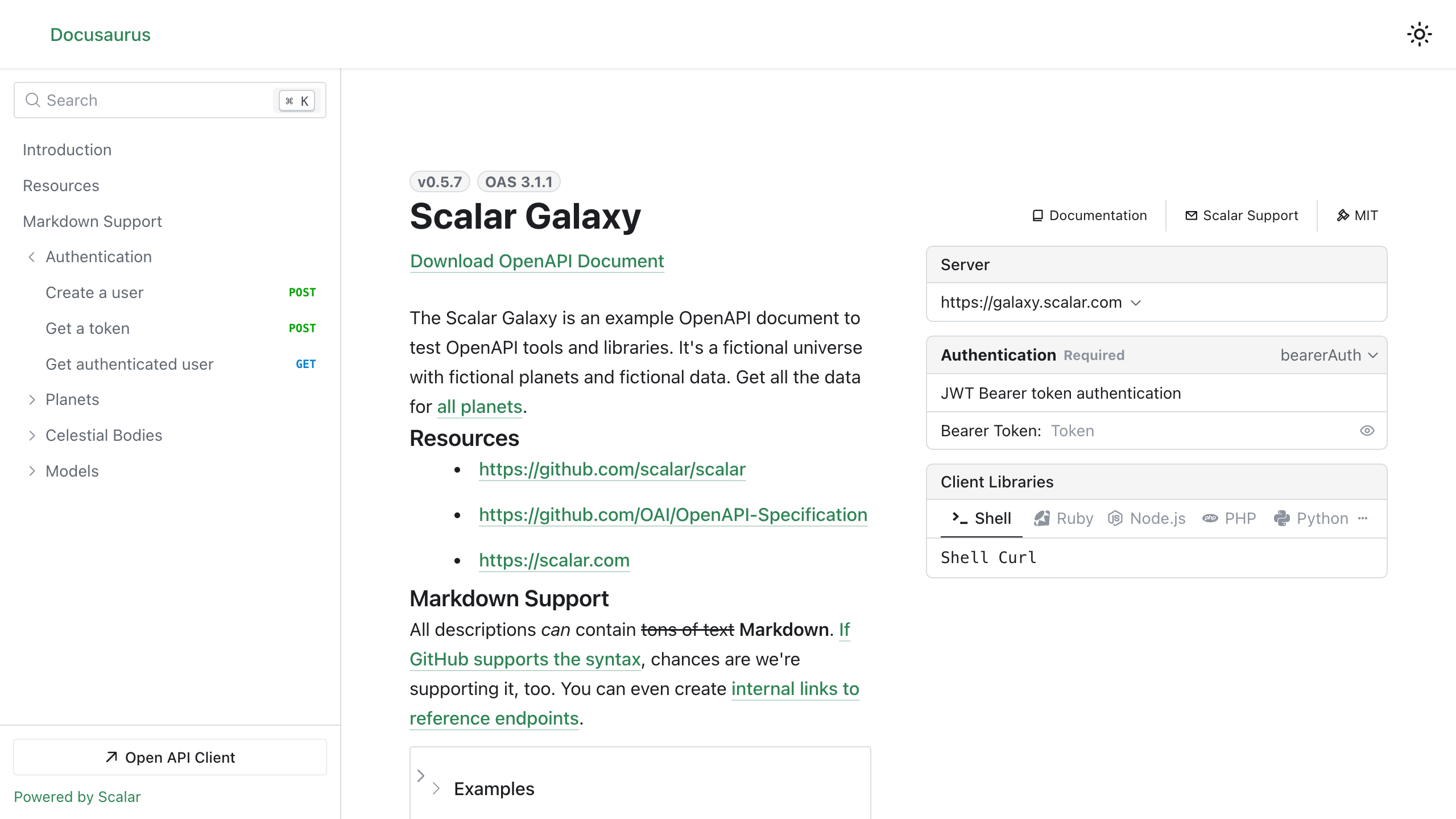
Installation
npm install @scalar/docusaurus
Usage
Simply add to the plugins section of your Docusaurus config. If you are using Typescript you can import the type options type as well.
import type { ScalarOptions } from '@scalar/docusaurus'

plugins: [
  [
    '@scalar/docusaurus',
    {
      label: 'Scalar',
      route: '/scalar',
      showNavLink: true, // optional, default is true
      configuration: {
        url: 'https://registry.scalar.com/@scalar/apis/galaxy?format=yaml',
      },
    } as ScalarOptions,
  ],
],
Multiple API references
Is it possible to show multiple API references? Yes, it is! :)
You can either display each API reference in its own page, or display multiple API references on a single page.
Create a page for each API reference
import type { ScalarOptions } from '@scalar/docusaurus'

plugins: [
  // First API definition
  [
    '@scalar/docusaurus',
    {
      // the `id` is required if you have multiple instances of the @scalar/docusaurus plugin
      id: 'scalar/galaxy',
      label: 'Scalar',
      route: '/scalar',
      showNavLink: true, // optional, default is true
      configuration: {
        url: 'https://registry.scalar.com/@scalar/apis/galaxy?format=json',
      },
    } as ScalarOptions,
  ],
  // Second API definition
  [
    '@scalar/docusaurus',
    {
      // the `id` is required if you have multiple instances of the @scalar/docusaurus plugin
      id: 'petstore',
      label: 'Petstore',
      route: '/petstore',
      showNavLink: true, // optional, default is true
      configuration: {
        url: 'https://petstore3.swagger.io/api/v3/openapi.json',
      },
    } as ScalarOptions,
  ],
],
Create a page that contains multiple API references
import type { ScalarOptions } from '@scalar/docusaurus'
plugins: [
  [
    '@scalar/docusaurus',
    {
      id: 'api-reference',
      label: 'API Reference',
      route: '/api-reference',
      showNavLink: true, // optional, default is true
      configuration: {
        sources: [
          {
            // This title will appear in the top left corner of your new API reference page.
            title: 'Scalar Galaxy API',
            url: 'https://registry.scalar.com/@scalar/apis/galaxy?format=json',
          },
          {
            title: 'Petstore',
            url: 'https://petstore3.swagger.io/api/v3/openapi.json',
          },
        ],
      },
    } as ScalarOptions,
  ],
],
Example
You can find an example in this repo under integrations/docusaurus/playground
Run the example using
npm run playground
Config
These configuration options are a WIP as this plugin is still in beta
label: string
The label on the nav bar for this route
route: string
Path at which the API Reference will be shown
configuration: ReferenceProps
You can find the full configuration options under packages/api-reference minus theme.
Guide
Create a new Docusaurus project (optional)
If you're starting fresh, let's install Docusaurus first:
Note: It seems there are some issues with Docusaurus and npm. We'd recommend to use pnpm, which is an awesome alternative to npm.
pnpm create create-docusaurus@latest my-awesome-website classic
If the installer asks you which language you prefer, pick whatever feels right. If you don't know what TypeScript is, use JavaScript. Both options will work great:
? Which language do you want to use?
❯   JavaScript
    TypeScript
You've got your project ready. Time to start the development server:
cd my-awesome-website
pnpm start
Boom, that's it. Open http://localhost:3000/ to see the Docusaurus example documentation.
Render your OpenAPI reference with Scalar
Okay, you're ready to render your API reference with Docusaurus?
First, install our plugin:
Note: It seems there are some issues with Docusaurus and npm. We'd recommend to use pnpm, which is an awesome alternative to npm.
Otherwise you'll probably receive something like:
npm ERR! Cannot read properties of null (reading 'matches')
pnpm add @scalar/docusaurus
There's just one more step required: Adding the plugin to your Docusaurus configuration.
// docusaurus.config.js

// …

const config = {
  // …
  plugins: [
    [
      '@scalar/docusaurus',
      {
        label: 'Scalar',
        route: '/scalar',
        configuration: {
          // Put the URL to your OpenAPI document here:
          url: 'https://registry.scalar.com/@scalar/apis/galaxy?format=json',
        },
      },
    ],
  ],
}
That's it, you made it! This should render our Scalar Galaxy example on http://localhost:3000/scalar if you used the OpenAPI url shown above, or your own APIs if you supplied your own.
Alternative: Docusaurus Configuration in TypeScript
Hey, big TypeScript fans here. If you're one, too, here's the Docusaurus configuration in TypeScript:
// docusaurus.config.ts
import type { Config } from '@docusaurus/types'
import type { ScalarOptions } from '@scalar/docusaurus'

// …

const config: Config = {
  // …
  plugins: [
    [
      '@scalar/docusaurus',
      {
        label: 'Scalar',
        route: '/scalar',
        configuration: {
          // Put the URL to your OpenAPI document here:
          url: 'https://registry.scalar.com/@scalar/apis/galaxy?format=json',
        },
      } as ScalarOptions,
    ],
  ],
}
CDN compatibility
Scalar loads only when an API reference route mounts. Sites that call window.Scalar.createApiReference on other pages must load the CDN bundle themselves. When pinning cdn to an older bundle, upgrade to a release with standalone style cleanup and Scalar.releaseUnusedStyles; older bundles can leave styles active after navigation, including when navigation interrupts loading.
What did you think of this content?