AsyncAPI
AsyncAPI is the event-driven counterpart to OpenAPI. An OpenAPI document describes endpoints you call and the responses you get back; an AsyncAPI document describes channels you connect to and the messages that flow over them — WebSocket streams, Kafka topics, MQTT subjects, server-sent events, and so on.
If your API pushes data instead of waiting to be asked for it, AsyncAPI is the format that describes it, and Scalar renders it as an API reference exactly like it renders OpenAPI.
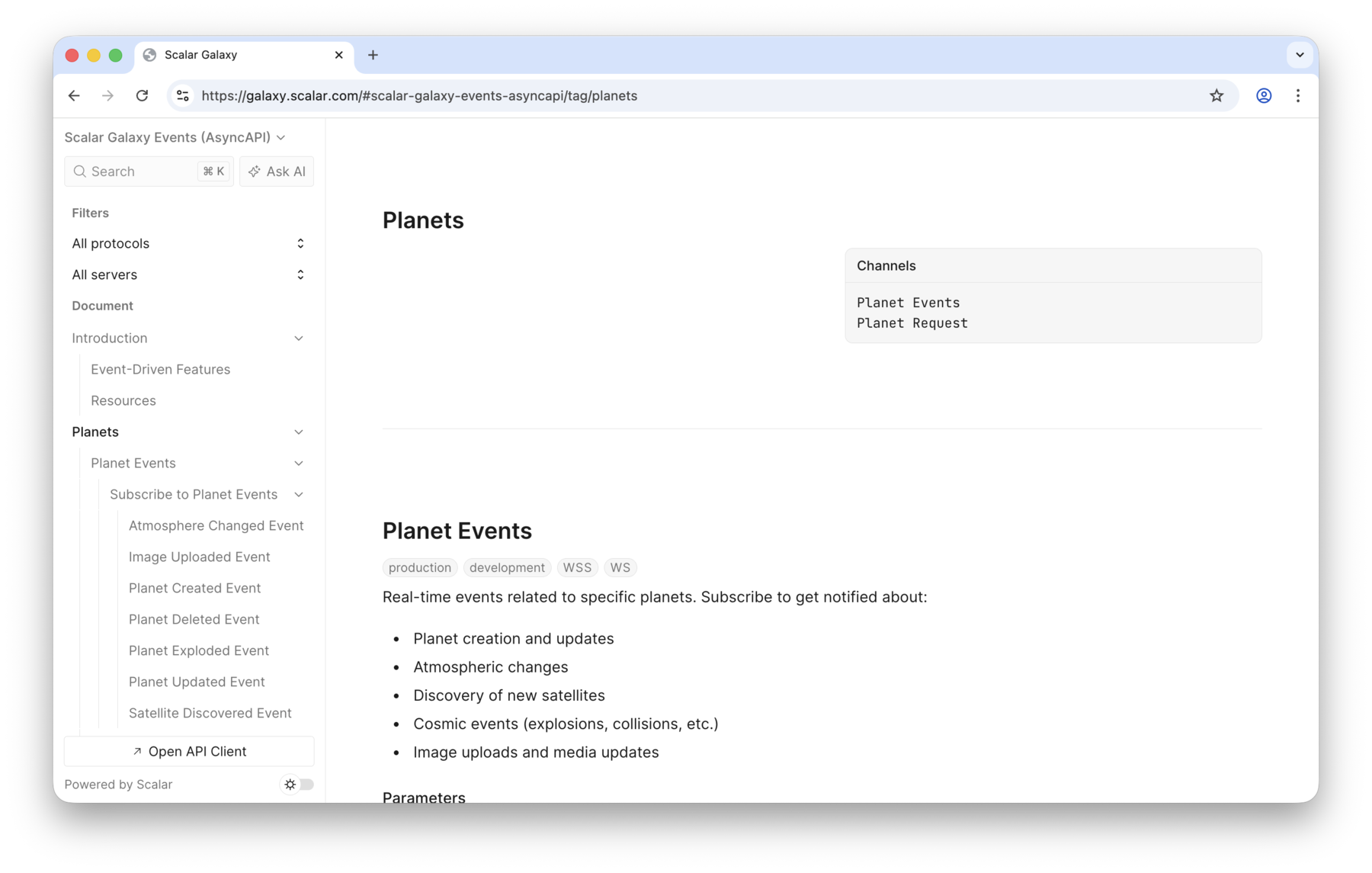
Want to see one before you write one? The Scalar Galaxy Events reference is rendered straight from this AsyncAPI document.
AsyncAPI support is still a work in progress, so not every part of the specification is rendered yet. If something you need is missing, open an issue or come tell us on Discord.
Rendering a document
You can load AsyncAPI documents the same way you load OpenAPI documents:
Scalar.createApiReference('#app', {
  url: '/asyncapi.json'
})
Everything else works the same way too: pass the document as a URL or as content, render it alongside your OpenAPI documents in one reference, or add it to a Docs project with an asyncapi navigation entry.
Coming from OpenAPI
The concepts line up closely, they just have different names:
| OpenAPI | AsyncAPI | In the reference |
|---|---|---|
Path (/planets/{planetId}) |
Channel (planets/{planetId}/events) |
A sidebar entry with its address, description, and parameters |
Operation (get, post) |
Operation with an action of send or receive |
Nested under its channel, labelled with the action |
| Request and response bodies | Message payloads | Collapsible message accordions under the operation |
servers[].url |
servers[].host, pathname, and protocol |
Server and protocol labels on the channel |
Root-level security |
The union of every server's security |
The authentication selector in the introduction |
components.schemas |
components.schemas |
The Models section |
The biggest thing to know: action is written from the point of view of the application the document describes. receive means that application receives the message (you send it), and send means it sends one to you.
An example document
A minimal AsyncAPI 3.0 document with one server, one channel, one operation, and one message:
asyncapi: 3.0.0
info:
  title: Scalar Galaxy Events
  version: 1.0.0
servers:
  production:
    host: galaxy.scalar.com
    pathname: /ws/v1
    protocol: wss
    description: Production WebSocket server
channels:
  planetEvents:
    address: planets/{planetId}/events
    title: Planet Events
    summary: Real-time event stream for a single planet.
    parameters:
      planetId:
        description: The planet to watch.
    messages:
      planetUpdated:
        $ref: '#/components/messages/PlanetUpdated'
operations:
  subscribeToPlanetEvents:
    action: receive
    title: Subscribe to Planet Events
    channel:
      $ref: '#/channels/planetEvents'
    messages:
      - $ref: '#/channels/planetEvents/messages/planetUpdated'
components:
  messages:
    PlanetUpdated:
      title: Planet Updated
      summary: A planet was updated.
      payload:
        type: object
        properties:
          id:
            type: integer
          name:
            type: string
          updatedAt:
            type: string
            format: date-time
That renders as a Planet Events channel carrying a wss label, with Subscribe to Planet Events nested underneath it and the Planet Updated message collapsed below that.
The full document behind the Galaxy example is available at packages/galaxy/src/documents/asyncapi/3.0.yaml.
Supported versions
The reference renders against the AsyncAPI 3.x shape. Older documents are upgraded automatically on load, so you can pass a 1.x or 2.x document and it renders the same way — there's nothing extra to configure.
Behind the scenes the document is converted to the latest 3.x version (for example subscribe/publish operations nested under a channel are lifted into the top-level operations map, and a server url is split into host and pathname). The original version is preserved on the document as x-original-aas-version for reference.
What renders
The reference renders the AsyncAPI document grouped by channel. For each channel you'll see:
- The channel title (or address) and description.
- Server and protocol labels for the channel: the servers it's available on (from
document.servers, restricted tochannel.serverswhen declared) and their protocols (for examplewss,kafka). - The channel address parameters.
- Each operation on the channel, nested beneath it, with its
send/receiveaction, title, and summary/description. - A Channel messages catalog containing every visible message defined on the channel, including messages that no operation lists. Channels with messages render even when they have no operations.
- Each message under its operation, shown as a collapsible accordion. The message header shows protocol labels for every protocol it's carried over — its channel's server protocols unioned with any protocols it declares its own
bindingsfor. Expanding a message reveals its description and its headers and payload schemas. Messages start collapsed and stay in sync with the sidebar, so selecting a message in the navigation (or opening a deep link to it) expands it here too.
Channels remain visible when no operation references them. Their messages appear directly beneath the channel, with the same schemas, examples, and navigation links as operation messages. Channels without messages remain visible too. Channels whose operations are all hidden with x-internal or x-scalar-ignore remain hidden.
An operation lists only its supported messages. Omitting its messages property includes every channel message; setting messages: [] includes none. The channel catalog does not change these operation subsets.
Reusable schemas defined under components.schemas are rendered in the Models section, just like OpenAPI.
Rendering works in both the modern and classic layouts.
Payload examples
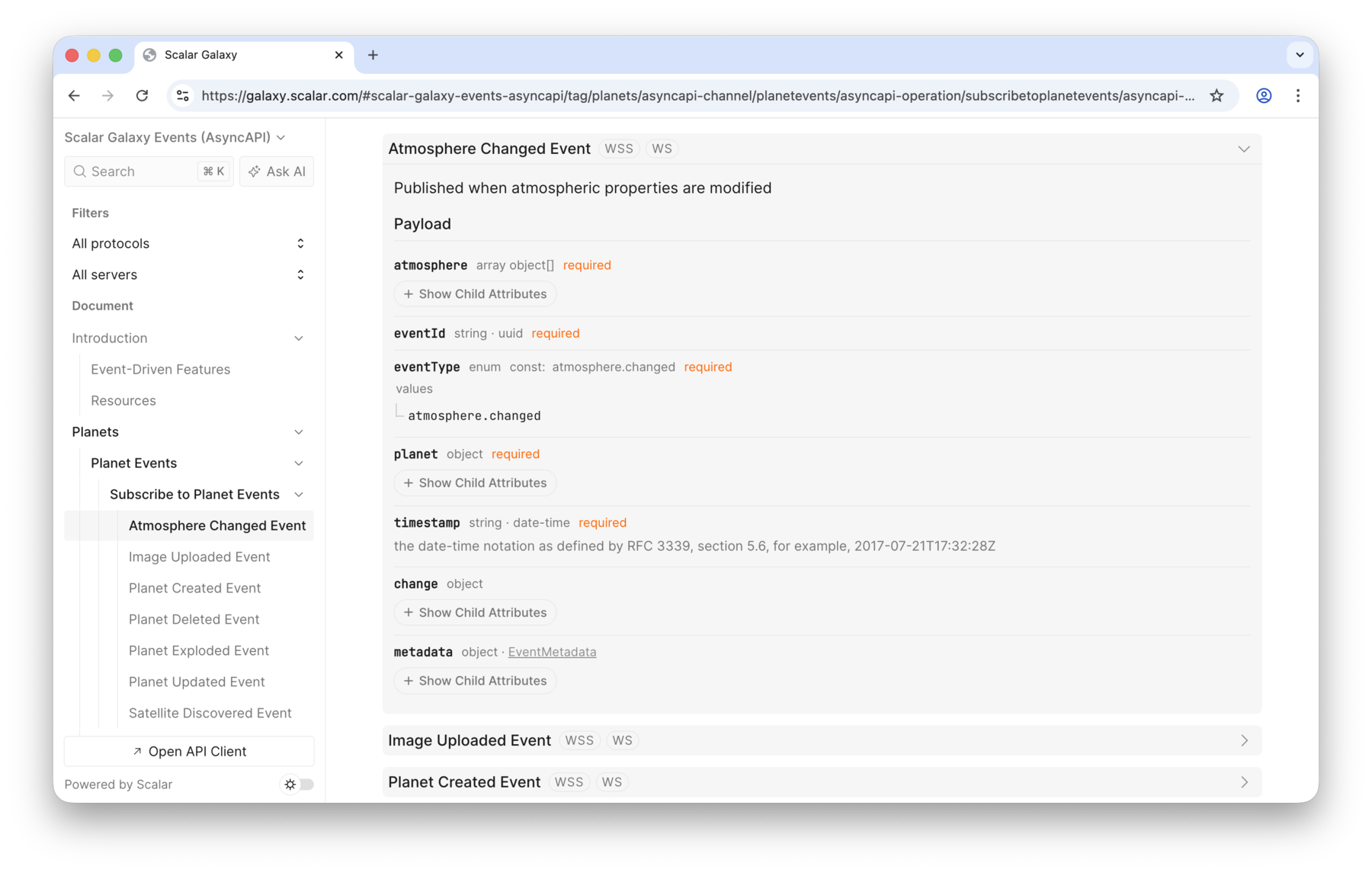
Message-level examples appear in a code panel with a copy button and a picker when there is more than one example. Examples inherited from message traits are supported too.
When no message example contains a payload, Scalar generates a representative payload from its JSON Schema automatically. Schema examples, defaults, and enum values are used by the shared example generator. The panel labels this fallback Generated example. Header-only examples remain available separately.
Generation supports native JSON Schema payloads and JSON Schema or AsyncAPI Schema wrappers. Other schema formats, such as Avro, and boolean payload schemas do not generate examples. Generated values illustrate the payload structure; they are not guaranteed to satisfy every JSON Schema constraint.
The server selector shows each server title alongside its connection URL, falling back to the server map key when no title is provided. The selected server also shows its summary, protocol version, and description when provided. Selection and variable updates continue to use the server map key.
Filtering by protocol and server
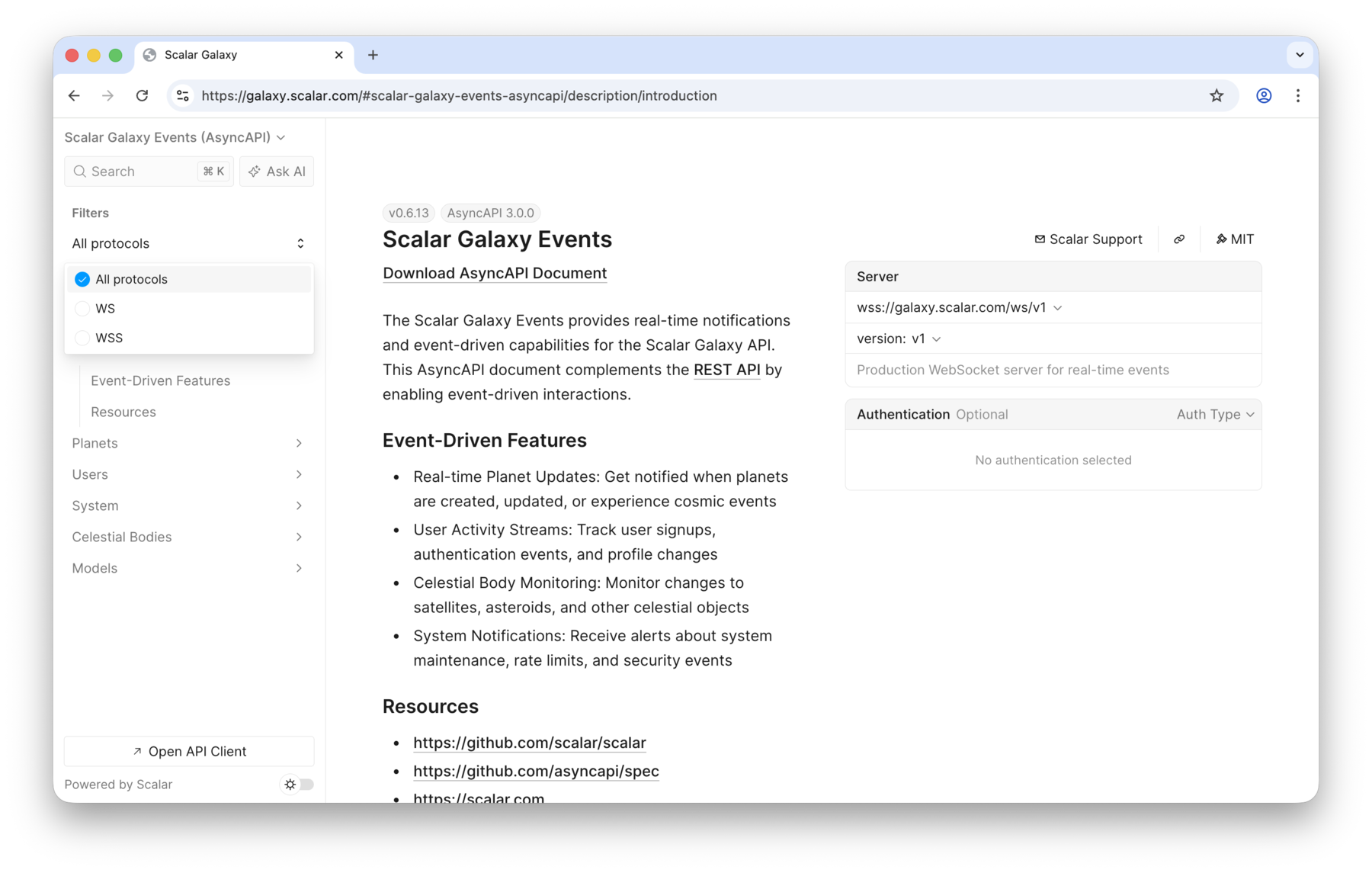
When a document defines more than one protocol or server, filter pickers appear at the top of the sidebar, stacked beneath the document picker and working just like it:
- Protocol — shown when the servers use more than one
protocol(for example awssWebSocket server alongside anmqttorkafkaserver). Selecting a protocol hides operations that aren't reachable over a server using it. - Server — shown when the document defines more than one server. Selecting a server hides operations whose channel isn't reachable through it.
Both filters operate on the navigation tree itself: operations and channel catalog messages that do not match are hidden, and their channel or tag is dropped when filtering removes all its children. Channels without operations are filtered using their own server availability, including channels without messages. Channels with an absent or empty servers list are treated as available on every server (and therefore every protocol). Choosing All protocols / All servers clears that filter, and the filters reset when you switch documents.
Each picker is only shown when there is more than one option to choose from.
Authentication
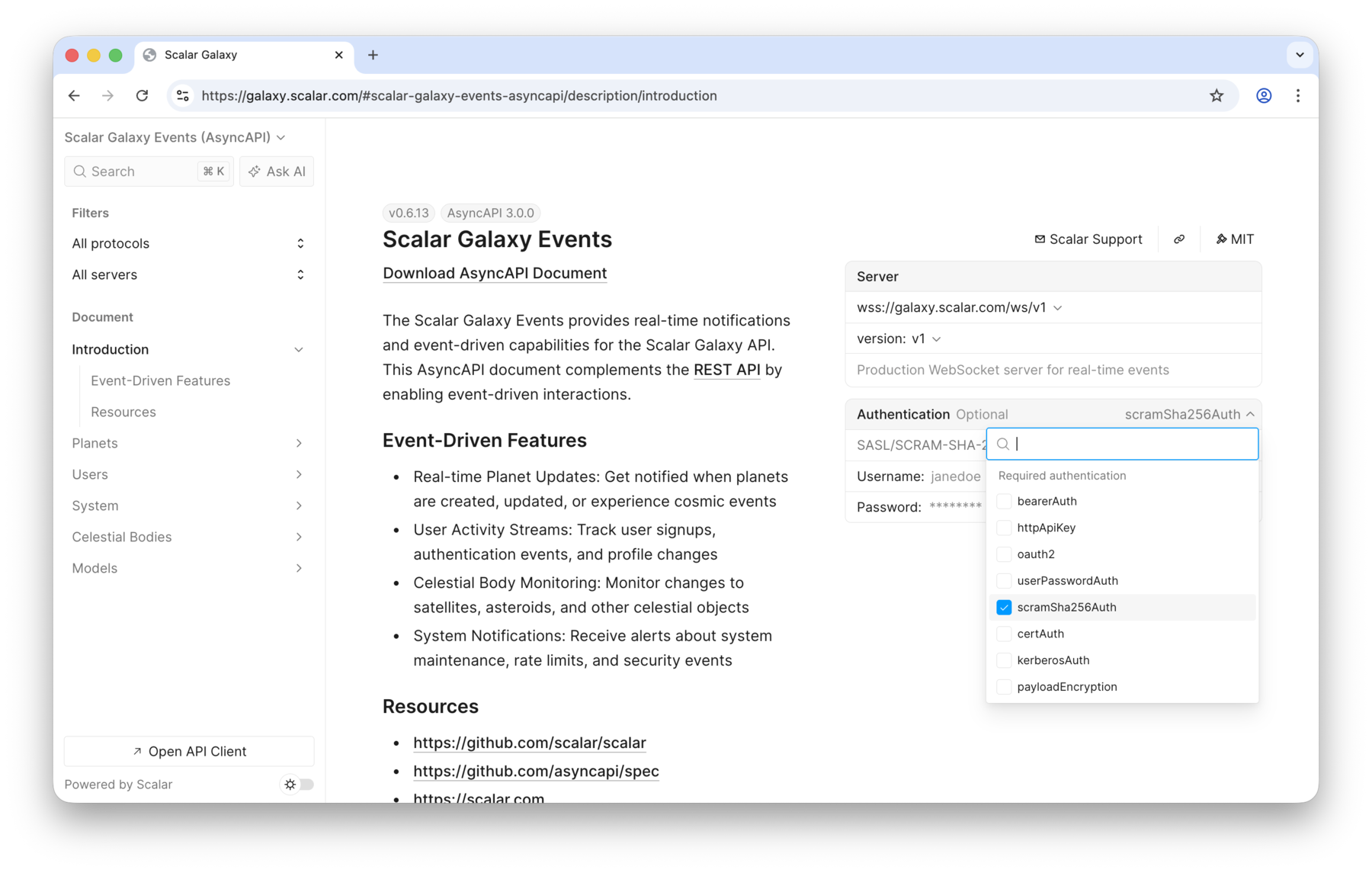
Document-wide authentication is rendered the same way as OpenAPI. When the document defines components.securitySchemes, an Authentication selector appears in the introduction, listing every scheme so you can fill in credentials.
Because AsyncAPI has no root-level security, the document-wide requirements are derived from the union of every server's security (a server applies to the whole connection). Operation- and channel-level auth is not surfaced yet — it needs more design and is tracked as a follow-up.
The selector fully supports the security scheme types that AsyncAPI shares with OpenAPI:
http(for examplebearerandbasic)oauth2openIdConnectapiKeyhttpApiKey(a named key inquery,header, orcookie; rendered as anapiKey)
The broker-specific scheme types have dedicated credential inputs too:
userPassword,plain,scramSha256,scramSha512— a username and password pair, just like HTTP basic.X509— a client certificate and private key (PEM).symmetricEncryption,asymmetricEncryption— a single key value.gssapi— the Kerberos service name to authenticate against.
Credentials are kept in the auth store alongside the OpenAPI ones, so they persist while you browse and never leave the browser.
Mocking an event-driven API
The mock server serves an AsyncAPI document as live endpoints: WebSocket channels push generated messages when a client connects, and one-way HTTP channels are served as an SSE stream. Message payloads are generated from the schemas in the document, so you can build against the API before it exists.
Generating SDKs
The same document can generate a client. The Scalar SDK Generator turns each channel into a WebSocket connect method or an HTTP streaming method, with typed send and receive events. AsyncAPI input to the SDK Generator is experimental.



